


Meta tags are the short pieces of HTML code that tell search engines and users what a page is about. Writing them well can lift your click-through rate without changing your rankings at all. In this guide, you’ll learn exactly how to write meta titles and descriptions that get clicked, plus the technical meta tags most guides skip.
Good meta tags do two jobs at once. They help search engines understand your content, and they convince a human to click your result instead of the nine others on the page. Most articles only cover the first job. This one covers both, with a practical checklist you can reuse for every page you publish.
Whether you’re optimizing an old blog post or launching a new product page, the process below works the same way. Let’s break it down section by section.
What Are Meta Tags and Why They Still Matter for SEO
Meta tags are snippets of code in a page’s <head> section that describe the page’s content to search engines and browsers. They don’t appear on the page itself, but they shape how your page looks in search results.
The two most important meta tags for SEO are the meta title (also called the title tag) and the meta description. Google displays both in search results, and users scan them before deciding where to click.
Meta tags don’t directly boost your rankings the way backlinks or content quality do. However, they strongly influence click-through rate. A higher click-through rate signals relevance to search engines and drives more visitors to your site, even at the same ranking position.
The Anatomy of a High-Performing Meta Title
A strong meta title balances three things: length, keyword placement, and appeal. Get all three right, and your title stands out in a crowded results page.
Keep the Right Length
Aim for 50 to 60 characters. Google typically displays around 600 pixels of a title, and longer titles get cut off with an ellipsis. A truncated title looks unfinished and can confuse readers.
Test your title before publishing. Free SERP preview tools show exactly how it will render on desktop and mobile, since mobile often displays fewer characters.
Add the Keyword Naturally
Place your main keyword near the front of the title whenever possible. Search engines give slightly more weight to early keyword placement, and users scanning results notice it faster too.
Avoid stuffing the same keyword twice. One natural mention reads better and still signals relevance clearly.
Make It Emotionally Compelling
A title that only states a fact rarely stands out. Add a benefit, a number, or a clear promise instead.
Compare these two examples:
- Weak: “Meta Tags Guide”
- Strong: “How to Write Meta Tags for SEO That Drive Clicks”
The second version tells the reader exactly what they’ll gain by clicking.
Writing Meta Descriptions That Earn Clicks
A meta description doesn’t directly affect rankings, but it heavily influences whether someone clicks your result. Think of it as your one-sentence sales pitch.
Character Limits and Truncation
Keep your meta description under 155 to 160 characters. Google sometimes rewrites descriptions automatically, but a well-written one still has a better chance of appearing as written.
Front-load the most important information. If Google truncates your description, the first sentence should still make sense on its own.
Include a Call to Action
End your description with a reason to click. Phrases like “learn how,” “see the full guide,” or “get the checklist” give readers a small nudge toward action.
Avoid vague CTAs like “click here.” They add words without adding value.
Match Search Intent
Your description should reflect what the searcher actually wants. Someone searching an informational keyword wants clarity and a promise of a clear answer. Someone searching a commercial keyword wants comparisons, pricing, or proof of quality.
Mismatched intent leads to high bounce rates, even if your click-through rate looks strong. Write for what the reader wants, not just for what ranks.
Common Meta Tag Mistakes That Hurt Click-Through Rate
Several recurring mistakes quietly hurt performance, even on well-written pages.
- Duplicate titles and descriptions across pages. Search engines and users both see this as low effort, and it can confuse which page should rank for a query.
- Keyword stuffing. Repeating the same phrase multiple times reads poorly and rarely improves rankings.
- Missing meta descriptions. When you leave this blank, Google auto-generates one from your page content, and the result often reads awkwardly.
- Clickbait that doesn’t match the content. This might boost clicks briefly, but it increases bounce rate and damages trust over time.
- Ignoring mobile display limits. A title that looks perfect on desktop might get cut off badly on a phone screen.
Fixing even two or three of these issues across your site can meaningfully improve click-through rate within weeks.
Essential Meta Tags for Modern Technical SEO
While standard guides focus heavily on page titles and descriptions, technical and product-focused websites require a broader metadata strategy to stand out in modern search engines. Beyond the basic snippet tags, leveraging Open Graph parameters, robots directives, and canonical tags directly controls how your brand renders across social previews, search indexing, and rich snippet features ensuring your technical architecture actively captures organic traffic. However, attracting organic visitors is only the first step; maximizing your site’s overall ROI requires converting that traffic effectively. If you want to turn your newly acquired search audience into paying customers, master run high-converting ads that boost sales to create a seamless acquisition funnel that turns high-intent clicks into measurable revenue.
Open Graph tags control how your page appears when shared on social platforms like LinkedIn or Facebook. Setting a custom Open Graph title, description, and image prevents platforms from pulling random text or images from your page.
The robots meta tag tells search engines whether to index a page and whether to follow its links. Use noindex for thin or duplicate pages you don’t want ranking, such as internal search results or filtered category pages.
The canonical tag points search engines to the preferred version of a page when duplicate or similar content exists at multiple URLs. This matters a lot for e-commerce and SaaS sites with filtered product listings, where the same content can appear under many URLs.
Setting these tags correctly prevents indexing issues that no amount of great content can fix on its own.
Tools to Test and Optimize Your Meta Tags
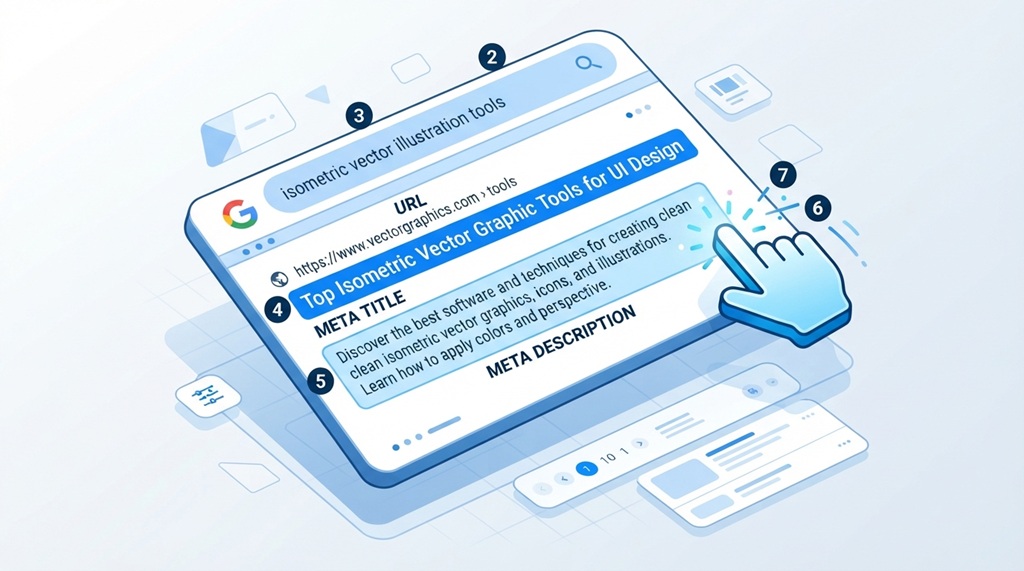
You don’t need to guess how your meta tags will look. Several free tools let you preview and test them before publishing.
- SERP preview tools show exactly how your title and description will render in search results, including truncation.
- Browser extensions let you inspect any live page’s meta tags instantly, which is useful for competitor research.
- Site audit tools flag missing, duplicate, or overly long meta tags across your entire site in one scan.
According to industry experts, running a quick meta tag audit every few months catches issues that creep in as content teams grow or pages get updated.
A Simple Meta Tag Writing Checklist
This checklist pulls everything together into steps you can follow for any page.
- Write the title first, keeping it under 60 characters.
- Place the main keyword near the beginning of the title.
- Add a clear benefit, number, or promise to the title.
- Write the description in 150 characters or less.
- End the description with a specific call to action.
- Check both against your target search intent.
- Preview both in a SERP tool before publishing.
- Confirm no other page on your site uses the same title or description.
Keep this checklist next to your content calendar. Running through it takes less than two minutes per page.
Frequently Asked Questions
How long should a meta title be for SEO?
Keep your meta title between 50 and 60 characters. This range fits most desktop and mobile displays without getting cut off by Google’s search results.
Do meta tags directly affect Google rankings?
Meta descriptions don’t directly affect rankings, but they influence click-through rate, which can indirectly support performance. The meta title carries slightly more ranking weight because it often contains the target keyword.
What happens if I don’t write a meta description?
Google will automatically generate one by pulling text from your page content. This auto-generated version often reads awkwardly and rarely includes a strong call to action.
Can I use the same meta description on multiple pages?
No, duplicate meta descriptions can hurt both your click-through rate and how search engines interpret each page’s unique value. Each page should have a description written specifically for its content.
How often should I update my meta tags?
Review your top-performing and top-traffic pages every three to six months. Search trends shift, and a meta tag written a year ago may no longer match how people search for that topic today.
Conclusion
Writing strong meta tags comes down to three habits: respect the character limits, lead with your keyword and a real benefit, and match what the searcher actually wants. None of this requires technical skill, just a bit of intention on every page you publish.
Start with your highest-traffic pages, run them through the checklist above, and track your click-through rate over the next month. Small changes to your titles and descriptions often produce results faster than almost any other SEO fix.





Leave a Reply